Introduction
For years, organisations treated “enable MFA” as the cornerstone of identity security. That assumption no longer holds.
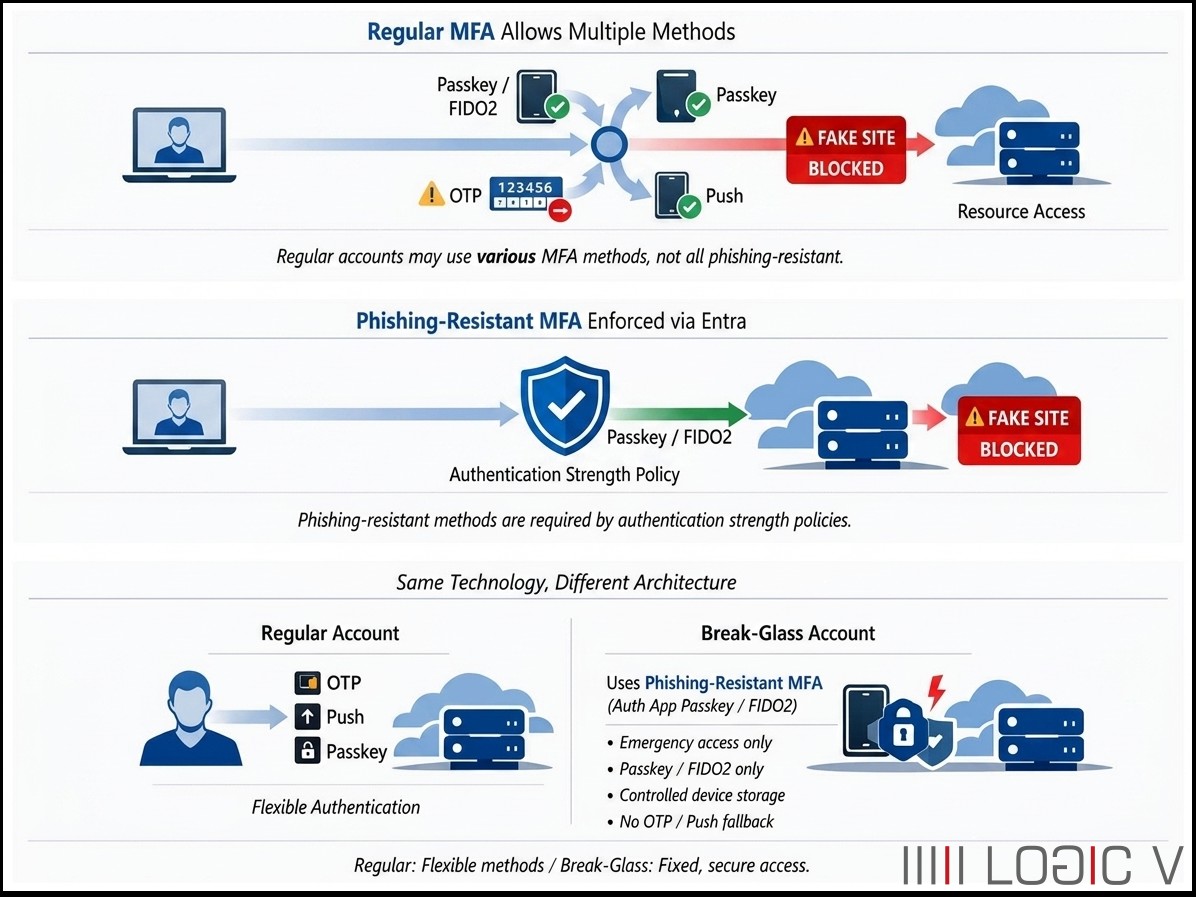
Modern attack techniques—such as adversary-in-the-middle phishing and MFA fatigue—have demonstrated that traditional MFA can be bypassed. As a result, Microsoft and Zero Trust frameworks now promote a stronger baseline:
Phishing-resistant authentication using cryptographic credentials.
At the same time, organisations must also ensure resilience, not just security. This is where break-glass (emergency access) accounts come into play.
This article brings together:
- The evolution from traditional MFA → phishing-resistant MFA
- Entra Authentication Strength policies
- Passkeys and FIDO2 (including Authenticator app passkeys)
- The correct design of break-glass accounts
- The key architectural difference between regular and emergency access
Why Traditional MFA Is No Longer Enough
Traditional MFA typically includes:
- One-time passwords (OTP) via apps or SMS
- Push notifications
- Voice or email verification
These methods improved security over passwords—but they share a critical flaw:
They rely on shared or user-transmitted secrets.
This means attackers can:
- Capture OTP codes via phishing pages
- Relay authentication requests in real time
- Exploit user behaviour (e.g., approve fatigue attacks)
Modern environments show that even with MFA enabled, accounts can still be compromised.
Phishing-Resistant MFA: A Fundamental Shift
Phishing-resistant MFA is not just “stronger MFA” — it is a different authentication model.
Instead of shared secrets, it uses:
- Asymmetric cryptography (public/private key pairs)
- Device-bound credentials
- Origin (domain) validation
This ensures:
- No codes are transmitted
- Credentials cannot be intercepted or replayed
- Authentication only works with the legitimate service
Microsoft explicitly highlights that traditional MFA methods like SMS, OTP, and push notifications are increasingly ineffective against modern phishing, driving the shift to phishing-resistant methods.
Examples of phishing-resistant methods
- Passkeys (FIDO2-based, including Microsoft Authenticator passkeys)
- FIDO2 security keys
- Windows Hello for Business
- Certificate-based authentication
Passkeys are particularly important because they:
- Use public/private key cryptography
- Keep the private key on the device
- Only respond to the correct domain
This makes them almost impossible to phish.
Key Difference: Traditional vs Phishing-Resistant MFA
| Feature | Traditional MFA | Phishing-Resistant MFA |
| Credential type | Shared secret (OTP/push) | Cryptographic key |
| Phishing risk | Vulnerable | Resistant |
| Replay attacks | Possible | Not possible |
| Example | SMS, OTP, Push | Passkeys, FIDO2 |
Entra Authentication Strength Policies
Microsoft Entra introduces Authentication Strengths, a critical capability in Conditional Access.
Authentication Strength = defines which authentication methods are allowed for access.
Instead of:
- “Require MFA”
You can enforce:
- “Require phishing-resistant MFA only”
How it works
During sign-in:
- User attempts authentication
- Conditional Access evaluates the request
- Authentication Strength policy checks the method used
- Access is granted only if the method meets requirements
Authentication Strengths allow organisations to enforce stricter methods (e.g., passkeys) for sensitive resources while allowing weaker methods for less critical access.
Built-in Authentication Strength Levels
| Level | Description | Example Methods |
| MFA Strength | Any MFA method | OTP, Push, SMS, FIDO2 |
| Passwordless | No passwords | Passkeys, Windows Hello |
| Phishing-Resistant | Cryptographic only | Passkeys, FIDO2, Certificates |
👉 The phishing-resistant level is the highest assurance and is recommended for sensitive access scenarios.
Microsoft Authenticator: Key Clarification
A common misunderstanding:
“Authenticator = phishing-resistant MFA”
This is only true in specific cases.
| Mode | Phishing-Resistant? |
| OTP (6-digit) | ❌ No |
| Push approval | ❌ No |
| ✅ Passkey (FIDO2) | ✅ Yes |
So:
- Microsoft Authenticator can be phishing-resistant
- But only when used as a passkey (FIDO2 credential)
Break-Glass Accounts: The Safety Layer
Break-glass accounts are:
Emergency access accounts used when normal authentication fails
Common failure scenarios:
- Conditional Access misconfiguration
- Identity provider outage
- MFA service downtime
- Device or user unavailability
Microsoft recommends maintaining these accounts to ensure organisations are not locked out of their tenant.
Modern Requirements
Historically:
- Break-glass accounts were password-only
- Often excluded from MFA
Today:
- MFA is required across environments
- Break-glass accounts must also use strong authentication
Recommended methods include:
- FIDO2 security keys
- Certificates
- Passkeys (in modern implementations)
The Most Important Insight: Same MFA ≠ Same Design
A critical question:
If both regular accounts and break-glass accounts use phishing-resistant MFA — what’s the difference?
The Answer
The difference is not the authentication method
It is the architecture and dependency model
Regular vs Break-Glass Accounts
| Aspect | Regular Account | Break-Glass Account |
| Purpose | Daily access | Emergency recovery |
| MFA | May include multiple methods | Fixed phishing-resistant method |
| Flexibility | High (policy-driven) | None (strictly controlled) |
| Device | Personal device | Controlled/dedicated |
| Dependencies | User + CA + identity systems | Minimal dependencies |
| Goal | Secure login | Guaranteed access |
Critical Design Differences
✅ Regular Accounts
May allow:
- OTP
- Push
- Passkey (depending on policy)
Depend on:
- User device
- Conditional Access
- Identity systems
👉 Designed for secure and usable daily operations
Break-Glass Accounts
Use:
- Phishing-resistant MFA only (Passkey / FIDO2)
Do NOT allow:
- OTP or push fallback
Are:
- Controlled (not tied to a person)
- Stored on dedicated or secured devices
👉 Designed for:
Access during failure scenarios, not convenience
Core Design Principle
Regular accounts optimise for security + usability
Break-glass accounts optimise for resilience + survivability
Why Passkeys (FIDO2) Are Ideal
Passkeys (including Authenticator passkeys) are:
- Phishing-resistant
- Device-bound
- Non-transferable
- Cryptographically verified
Key benefit:
Authentication only succeeds against the legitimate service, preventing replay or interception
This makes them suitable for:
- Privileged accounts
- Admin access
- Break-glass scenarios
Putting It All Together
✅ Recommended Entra Strategy
| Scenario | Authentication Approach |
| End users | MFA Strength (mixed methods) |
| Workforce modernisation | Passwordless MFA |
| Admin accounts | Phishing-resistant MFA |
| Break-glass accounts | Phishing-resistant MFA (strict, controlled, no fallback) |
✅ Takeaway
- Traditional MFA is no longer sufficient on its own
- Phishing-resistant MFA eliminates entire classes of attacks
- Authentication Strength policies enforce how users authenticate
- Break-glass accounts ensure you can always recover access
Final Summary
Even when both regular and break-glass accounts use phishing-resistant MFA such as passkeys (including Microsoft Authenticator passkeys), regular accounts are designed for flexible, policy-driven authentication, while break-glass accounts enforce a fixed, controlled authentication model optimised for availability during system failure.