
In an era of rapidly evolving cyber threats and stretched security operations teams, organizations are looking for new ways to accelerate detection, investigation, and response. Microsoft Security Copilot (formerly called Copilot for Security) represents Microsoft’s push to bring generative AI powered by security-specific models into the SOC.
This article explores what Security Copilot is, how it works, where it fits in the security stack, the benefits and limitations, and key considerations for adoption.
What Is Security Copilot?
At its core, Security Copilot is a generative AI assistant built specifically for security operations. It:
-
Leverages large-language models (LLMs) plus Microsoft’s security-specific training and threat-intelligence signals.
-
Integrates with Microsoft’s security portfolio (e.g., Microsoft Defender, Microsoft Sentinel) to draw on live alerts, logs and detections.
-
Enables analysts to use natural language (“What’s the root cause of this incident?”, “List all user risk events this week”, etc) rather than solely manual queries.
-
Aims to reduce the operational burden on security teams, improve speed and accuracy, and democratize advanced security skills across the team.
Key Capabilities
Some of the main capabilities include:
-
Incident investigation assistance: Summarizing incident details, correlating technology and threat intelligence, recommending next steps.
-
Threat hunting and vulnerability management: Generating suggestions based on known patterns and attacker behaviours.
-
Knowledge base integration: For instance, pulling in your organization’s policies, logs or documentation to tailor responses.
-
Custom prompt books: Pre-defined workflows or sets of prompts that teams can build and reuse.
Why It Matters
Here are some of the key drivers pushing organizations toward solutions like Security Copilot:
-
Skills gap: There simply aren’t enough experienced analysts to keep up with the volume and complexity of alerts. Security Copilot can help bridge that.
-
Alert overload: Modern environments generate massive amounts of telemetry, making it difficult to isolate critical threats. Copilot’s summarization and correlation aim to reduce noise.
-
Speed is critical: In threat response, every minute counts. The ability to act faster with more context is increasingly a differentiator.
-
Better contextualisation: Bringing threat-intelligence signals, telemetry, log data and human-readable guidance into one place helps less-experienced analysts be more effective.
How It Works
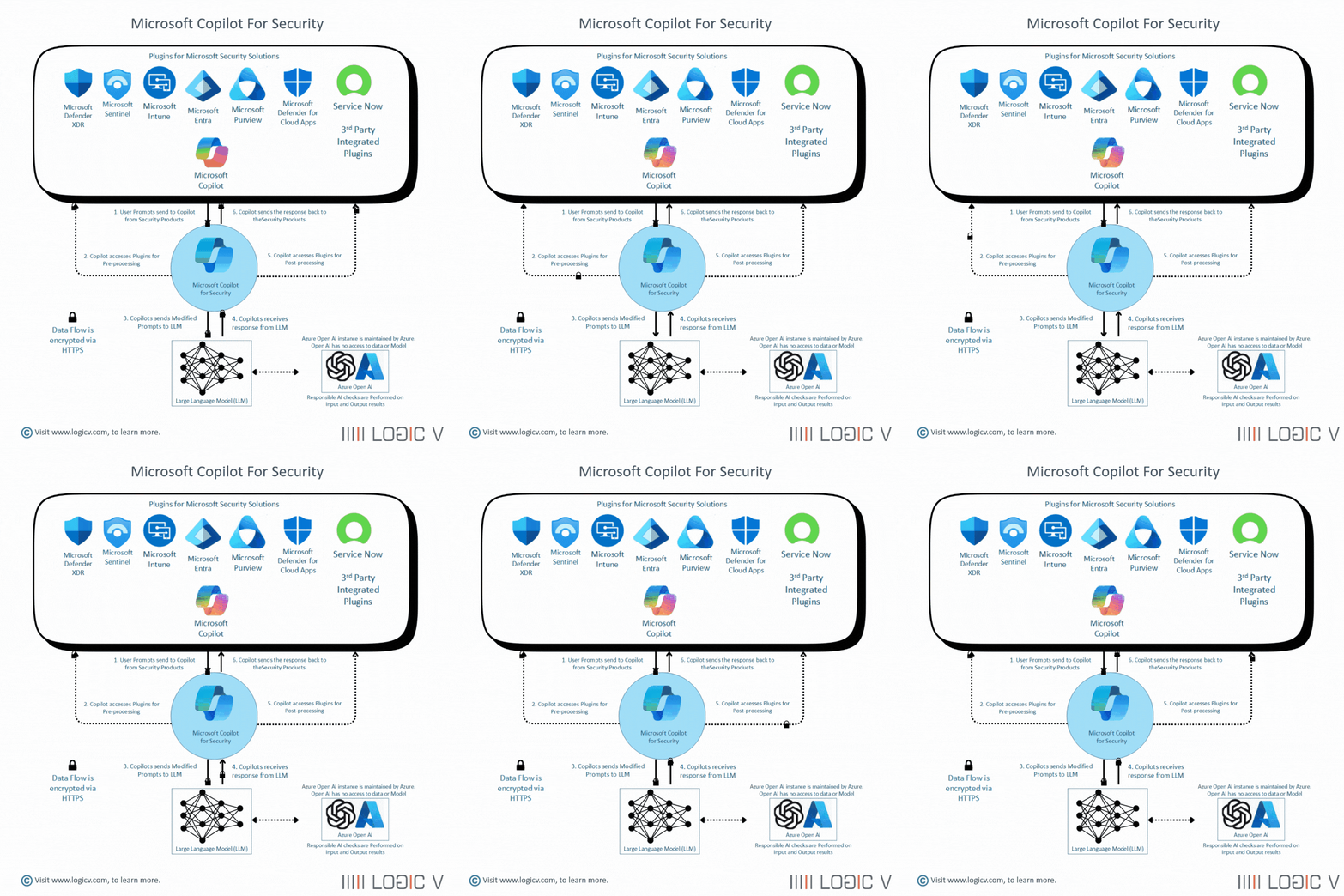
Here’s a simplified view of how Security Copilot fits into the security workflow:
Data Ingestion & Context
The system draws on:
-
Microsoft’s global threat-intelligence pool (trillions of signals per day).
-
Customer telemetry from Defender, Sentinel, Entra, and other sources.
-
Your internal documentation or knowledge base (if integrated).
Generative AI Model with Security Specialisation
-
The LLM is customised for security tasks: incident triage, threat detection patterns, remediation actions, etc.
-
You interact using natural language prompts rather than just query languages (though query languages still underlie many workflows).
Analyst Interaction
-
You might ask: “What are the root causes for the last failed sign-in events across this tenant?”
-
Copilot gives you a concise, actionable summary, links to evidence, and recommends next steps.
-
You can then drill down, ask follow-up questions, convert summary into reports or remediation tasks.
Integration & Workflow
-
Copilot may be embedded inside Defender’s portal or Sentinel to sit within existing workflows.
-
It can suggest automation or policy changes (e.g., Conditional Access tweaks) based on findings.
Considerations & Limitations
No tool is perfect — there are important caveats to keep in mind.
Strengths
-
Offers speed and context, especially for high-volume or repetitive tasks.
-
Lowers the barrier for less experienced analysts to contribute effectively.
-
Integrates with Microsoft’s security stack, making deployment relatively straightforward for Microsoft-centric environments.
Weaknesses and Risks
-
Dependent on data quality & scope: Garbage in, garbage out. If your telemetry is incomplete or your environment not fully integrated, results may be limited.
-
AI errors: Generative AI can hallucinate or miss subtle context. Analysts must critically review suggestions. Microsoft explicitly states the model doesn’t always get everything right.
-
Cost & licensing: Early feedback suggests pricing may be prohibitive for smaller organisations.
-
Governance & data-protection concerns: Using AI on sensitive security data raises questions about privacy, access controls and data usage. Proper controls must be in place.
-
Vendor lock-in / ecosystem constraints: While great for Microsoft-centric stacks, if you use heterogeneous tools (third-party SIEM, etc) you may face integration gaps.
Best Practices for Adoption
To get the most value from Security Copilot, consider the following:
-
Ensure strong telemetry coverage
-
Bring in logs from Defender, Sentinel, Entra, endpoints, etc.
-
Validate your data quality and correlation.
-
-
Define the scope and use-cases
-
Start with a defined scenario (e.g., sign-in anomalies, phishing investigations) rather than “everything at once”.
-
Build “prompt books” and workflows aligned to your SOC’s tasks.
-
-
Train analysts on how to use it
-
AI assistant ≠ full automation. Analysts must interpret suggestions and validate.
-
Provide training on effective prompting, follow-up queries, and reviewing results.
-
-
Integrate with existing processes
-
Embed Copilot into your incident-response playbooks, case-management systems.
-
Link to automation (e.g., Sentinel playbooks) where appropriate.
-
-
Govern usage & monitor metrics
-
Track usage/reply metrics to determine ROI (speed, accuracy, time-savings).
-
Monitor for potential misuse or over-reliance.
-
-
Maintain good security hygiene
-
AI doesn’t replace fundamentals: identity/access controls, patching, MFA, endpoint protections.
-
Use AI as augmentation, not crutch.
-
-
Prepare for scale and cost-management
-
Monitor consumption units or licensing metrics so you don’t overspend.
-
Reassess periodically whether cost aligns with value delivered.
-
Future Outlook
The evolution of Security Copilot is likely to include:
-
Deeper third-party tool integrations (non-Microsoft SIEMs, OT/ICS, etc).
-
More pre-built “agents” or workflows for specific verticals (financial, healthcare, government).
-
More automation orchestration: the AI might not just assist but trigger response playbooks automatically.
-
Improved cost models and consumption flexibility for smaller organisations.
-
Continued emphasis on AI governance, data privacy, and adversarial resilience.
Conclusion
Security Copilot brings a compelling vision: amplify human defenders with generative AI that can summarize complex telemetry, surface hidden patterns, and guide next-step actions — all at machine speed. When used strategically, it can help bridge skills gaps, accelerate investigations and reduce analyst burden.
However, its success depends heavily on data readiness, thoughtful adoption, integration with processes, and ongoing governance. Organisations should treat Copilot as a powerful augmentor, not a silver bullet — combining it with solid fundamentals in security operations.
As Microsoft puts it, this is “security for all, powered by AI”. Microsoft With the maturity of the tool increasing, now is a good time for organisations to evaluate whether this next-generation security copilot can become a force-multiplier in their cyber defence strategy.