


Tackling Overwhelm with AI: The Benefits of Microsoft Copilot
You know the feeling—your inbox is overflowing, deadlines loom, and repetitive tasks are draining your day.
A recent study by Microsoft revealed that 64% of U.S. employees struggle with having enough time and energy to do their jobs effectively (Microsoft Work Trend Index 2023). That cognitive overload has become the enemy of productivity.
“AI assistants are bridging the productivity divide while preserving quality of work.”
You need tools that genuinely make an impact. In this blog, we’ll break down what are the main benefits of using Microsoft Copilot for productivity, empowering you to decide if it’s the AI boost your business needs.
1. Efficiency Gains: The Core Benefits of Microsoft Copilot
Let’s be real—manual tasks are the black holes of productivity. Drafting repetitive emails, summarizing long meetings, hunting through documents—it all adds up. Copilot helps you reclaim that time.
It’s embedded directly into Microsoft 365 apps, such as Word, Outlook, and PowerPoint, allowing you to automate first drafts, pull in relevant data, and summarize entire threads or documents in seconds.
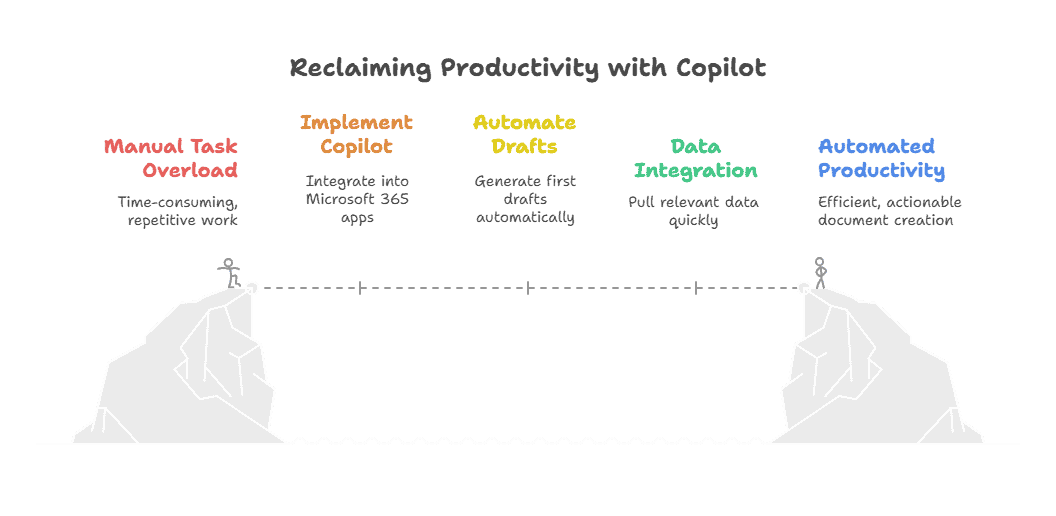
For example, instead of spending 30 minutes creating a client meeting summary in Word, you can ask Copilot to “summarize the last Teams meeting and highlight next steps.” It’ll generate a crisp, actionable document that you can refine or send as-is.
2. Smarter Insights
Gone are the days when you needed advanced Excel knowledge to pull value from data. With Copilot, you simply ask questions in natural language—“What are the sales trends by region in Q2?”—and it sifts through rows and columns, surfaces insights, and builds charts to back them up.
It acts like a business analyst who never sleeps. You get data-backed answers, forecasts, and even anomaly detection—without needing to Google formula syntax. Whether you’re a seasoned analyst or a spreadsheet novice, Copilot democratizes data literacy across your organization.
Get Expert Help with Copilot for Your Business
Leverage our years of expertise to level-up your team’s effectiveness.
3. Sharper Communication: Exploring Microsoft Copilot Benefits
Email. Chat. Meetings. We live in our inboxes and chat threads. But managing communication shouldn’t feel like your full-time job. That’s where Copilot changes the game.
Inside Outlook and Teams, Copilot summarizes lengthy email chains, suggests intelligent replies based on tone and content, and automatically extracts action items. It even helps you prepare for upcoming meetings by analyzing related documents and conversations.
4. Personalized Workflows
What makes Copilot powerful isn’t just that it’s smart—it’s that it’s yours. It draws context from your emails, meetings, files, calendar, and even your writing style. This means the suggestions it offers aren’t generic—they’re relevant, targeted, and grounded in your specific work.
Whether you’re writing a proposal or building a deck, Copilot offers phrasing and formatting that mirrors how you typically communicate. Think of it like having a digital colleague who’s shadowed you for a year and knows your preferences, clients, and priorities.
More articles you might like: |
5. Creativity Unleashed
Creativity doesn’t always come when you call it. Some days, that blinking cursor is your worst enemy. Copilot offers a remedy by acting like a brainstorming partner.
In Word, it can generate content outlines, rephrase paragraphs, or even give you fresh metaphors. In PowerPoint, it can create visual layouts, suggest icons or slide transitions, and craft compelling summaries from source documents.
6. Secure Integration: Highlighting the Benefits of Microsoft Copilot
A huge concern with AI tools is: Where does my data go? Copilot avoids that worry entirely. It runs on Microsoft’s secure, enterprise-grade cloud. It respects the exact compliance boundaries, encryption standards, and access permissions your organization already enforces.
So if a file is restricted to your department, Copilot won’t generate content based on it for someone else. It’s context-aware, but permission-respecting. This is crucial for regulated industries or anyone handling sensitive data.
Benefits of Microsoft Copilot at a Glance
| Benefit Area | What It Does | Impact |
| Efficiency | Automates drafting, summarizing | Saves ~1 hr/day |
| Insights | Generates charts, formulas in Excel | Data-backed decisions |
| Communication | Summarizes threads, proposes replies | Improves clarity |
| Personalization | Learns your style & context | More relevant output |
| Creativity | Brainstorms content & design | Enhances originality |
| Security | Inherits Microsoft 365 controls | Keeps data safe |
| Learning | Instant “how-to” guides within apps | Supports upskilling |
| ROI | Activates full M365 value | Maximizes subscription potential |
7. Built-In Learning: What are the Benefits of Microsoft Copilot?
We’ve all wasted hours clicking through menus or watching YouTube tutorials trying to find how to do something in Excel or Word. With Copilot, you just ask.
Need to build a pivot table? Automate email replies with rules? Create a presentation template? Just type your request in plain English, and Copilot shows you how—or does it for you.
This on-demand help boosts confidence, reduces frustration, and decreases the number of help desk tickets. It’s like having a virtual trainer embedded into every Microsoft 365 app—always available, never condescending.
8. Maximized ROI: What are the Main Benefits of Using Microsoft Copilot for Productivity?
Most organizations only scratch the surface of what Microsoft 365 can do. With over 345 million paid Microsoft 365 subscriptions worldwide, the value of unlocking the suite’s full potential is massive.
Copilot acts as the key. It activates features many users didn’t know existed or didn’t have time to learn. Instead of letting these powerful tools go underutilized, Copilot brings them front and center—wrapped in natural language interfaces and clever, guided prompts.
That’s how you turn a software investment into a business growth engine—by ensuring every license adds tangible, daily value to your people’s work.
Choose Logic V to Maximize the Benefits of Using Microsoft Copilot for Your Business
All this potential won’t flourish without a strategy.
Logic V expertly guides deployment—from workflow design to change management—so you actually reap these benefits of Microsoft Copilot. We ensure seamless adoption, alignment with compliance, and continuous optimization across your teams.
Trusted Microsoft Management Services Near You |
||||
Contact Logic V today for a free consultation and start accelerating your business with Copilot.